


Editor’s Note: This article is the companion piece to Episode 029 of Unstuck to Finding Your Edge, my weekly Live series with Robyn Levin and in this episode we talk about our top tips for artificial intelligence and Substack.

By the time I hit publish on a Substack article, I’ve already prepared my pinned comment, SEO information, podcast description, thumbnail, key takeaway, and promotional Notes.
And I’ve done most of it within the same ChatGPT conversation.
The article itself is only one part of my publishing process.
During this week’s episode of Unstuck to Finding Your Edge, Robyn Levin and I discussed how we use AI to capture ideas, develop content, maintain our brand identity, and make our publishing responsibilities more manageable.
Whether you use ChatGPT, Claude, Perplexity, or another AI platform, here’s how you can apply these strategies to your own publication.

20% OFF UNSTUCK TO PUBLISHED EXCLUSIVE BLACK FRIDAY HOLIDAY SALE UNTIL DECEMBER 5th🎉💜
If you’ve been thinking about joining the paid side of Unstuck to Published, now’s a pretty damn good time.
Join annually for $177.60/year (normally $222) and unlock:
📕 The Ultimate Substack Beginner’s Blueprint ($47 value!!)
🎓 My Substack Masterclass — 10 Things I’d Do If I Were Starting My Substack Today ($197 value!!)
✅ Build Your Substack in 90 Minutes Foundational Checklist
💬 Private Community Chat & direct access to me for questions and hands-on support
🔓 Full access to my paid Substack content + subscriber perks
20% off. One year. Everything inside.
👉 Join Unstuck to Published for $177.60/year
The tools are here. Let’s build the damn thing. 💜
1. Transcription Is a Cheat Code for Digital Writing
Who says your writing process has to begin with typing?
Imagine spending 15 minutes talking through everything you want to include in an article instead of sitting at your computer trying to type it all out.
You can do this directly inside Substack:
Create a podcast or video post.
Record yourself talking through your ideas.
Generate and download the transcript.
Leave the unpublished recording in your drafts.
Upload the transcript to your preferred AI platform.
You’ve essentially created a verbal brain dump without purchasing another transcription tool.
Robyn uses the Voice Memos app on her iPhone to capture article ideas while walking.
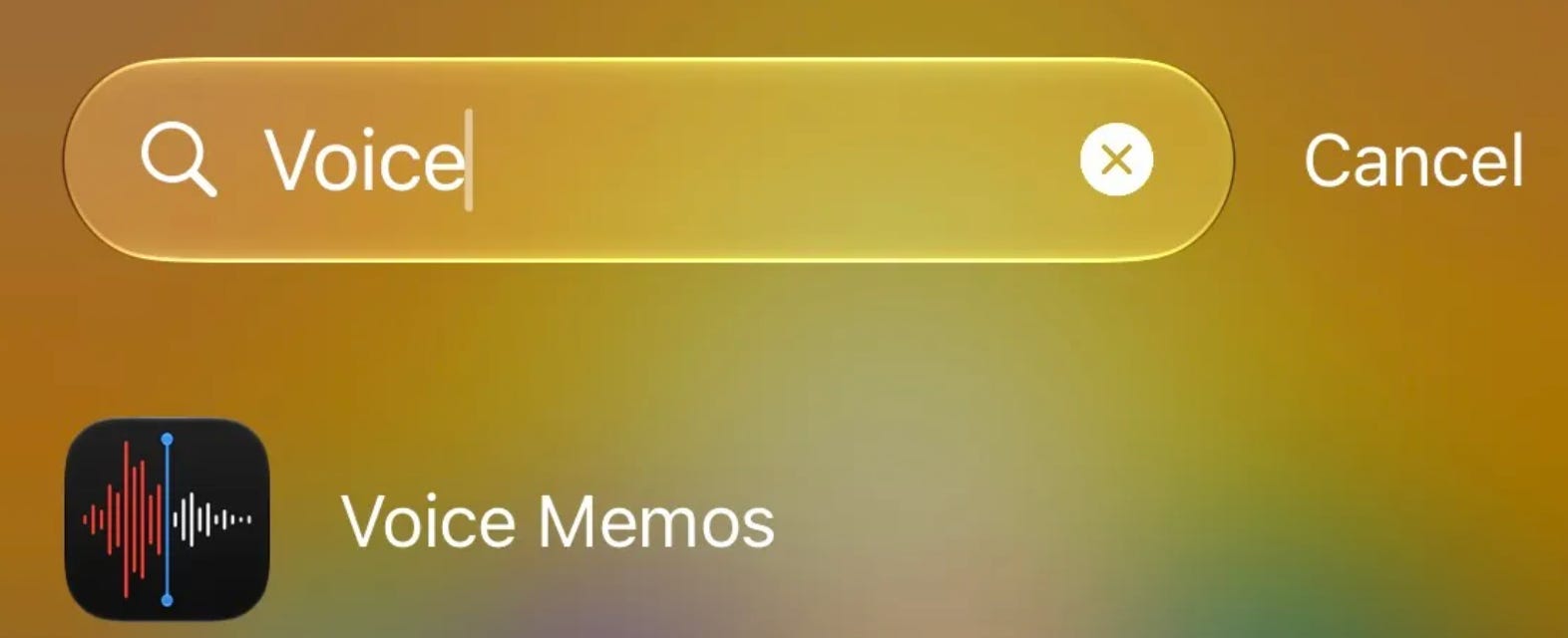
Robyn then copies the transcript and uses AI to help organize her thoughts.🐐
Here are three ways you can incorporate transcription into your writing process:
Substack Recording Studio: Record a verbal brain dump for your next article.
Voice Memos app or Voice Recorder app: Capture ideas whenever inspiration strikes.
Existing Substack Live transcripts: Develop articles from previous conversations.
Try this prompt:
Analyze this transcript, identify my central message, and organize my thoughts into an article outline. Preserve my perspective and original ideas. Don’t invent information or personal experiences.
→ There’s a difference between giving AI a topic and asking it to write an article and giving AI a transcript of YOUR thoughts, experiences, opinions, and expertise.
You’re still the source of the content.
2. Show AI What Good Looks Like
If you want AI to help you develop content that reflects your personality, why would you expect it to guess what your personality is?
Give it examples of your previous articles.
Explain your writing preferences.
Identify phrases you dislike.
Describe who you’re writing for.
The same principle applies to your visual branding.
Robyn shared how she provides ChatGPT with a previous episode graphic that she likes. She can then provide the new episode title and date while using the existing graphic as a creative reference.
You can apply this technique to your article thumbnails, promotional graphics, and other branded content.
Don’t feel obligated to accept the first output.
Ask for constructive criticism.
Clarify it understands the task.
Identify what’s missing.
Challenge the suggestions.
Make revisions until you’re satisfied with the result.
AI can assist with the creative process, but you should still be directing it.
3. Give AI Better Instructions & Check Its Work!
Robyn recently used ChatGPT to research a contractor for a potential kitchen renovation.
The reviews were excellent!
Unfortunately, they were for the WRONG contractor in Texas instead of the one she was considering in Florida. 😂
This is why providing context and verifying information matters.
When conducting research for an article, specify the relevant timeframe, location (when applicable), and types of sources you want to use.
For example:
Find relevant peer-reviewed research published within the last five years that supports or challenges this argument. Provide links to the original studies, identify their limitations, and distinguish research findings from your interpretations.
Then open the sources yourself.
→ Check that they exist, that the findings are accurately represented, and that they actually support the claims you’re making.
You’re still the publisher. You’re responsible for what you publish.
4. Turn One Article Into an Entire Publishing Package
This is where AI saves me a considerable amount of time.
Once I’ve developed and refined my article, I use the same conversation to prepare the supporting content.
Here are examples of the prompts I use throughout my publishing process:
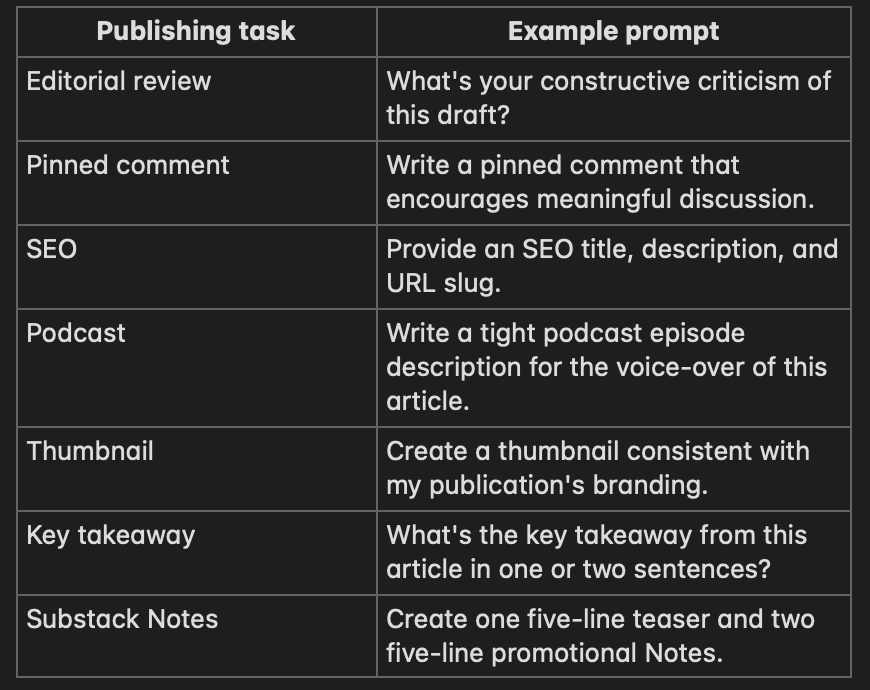
Thankfully because I’m working within the same conversation, AI already has the article and the context behind it.
I review the supporting content, schedule my promotional Notes, and prepare everything for publication.
You don’t need to become a prompt engineering expert to develop an effective publishing workflow.
5. Give Your Existing Content a Second Life
Your publication’s archives are a resource you already own.
Instead of reposting an older article with a different headline, give AI the original article or transcript and ask it to help you explore:
A different perspective on the same topic.
Questions the original article left unanswered.
Ideas that deserve their own standalone article.
New research or developments since publication.
Takeaways that could become Substack Notes.
You can also revisit previous Substack Lives and podcast episodes.
→ A single conversation might contain several ideas worth developing into separate articles.
Repurposing content should give your readers something new to think about, even when you’re revisiting a familiar subject.
6. Choose Tools Based on Your Publishing Needs
Robyn shared two AI tools she’s been using for years:
OpusClip: Robyn uses this to turn longer videos into shorter clips, remove filler words and pauses, add branded captions, and prepare videos for different platforms.
Magai: This platform provides access to multiple AI models within one interface, allowing Robyn to select and compare models depending on the task she’s working on.
If you’re producing a lot of video content or regularly switching between AI models, these tools may be worth exploring.
However, Substack also offers transcription and video clipping features.
Consider what you can accomplish with your existing tools before adding another subscription to your monthly expenses.
Your AI-Assisted Publishing Workflow
Here’s how you can put everything together:
Capture: Record your ideas and generate a transcript.
Develop: Organize, write, critique, and revise your article.
Verify: Check your research, references, and factual claims.
Package: Prepare your SEO information, thumbnail, podcast description, and pinned comment.
Promote: Create your teaser, promotional Notes, and key takeaways.
Repurpose: Revisit your content to develop new articles, Notes, and video clips.
Start with one article, one primary AI platform, and a repeatable publishing process.
Here is an example of a publishing checklist for each of your articles:
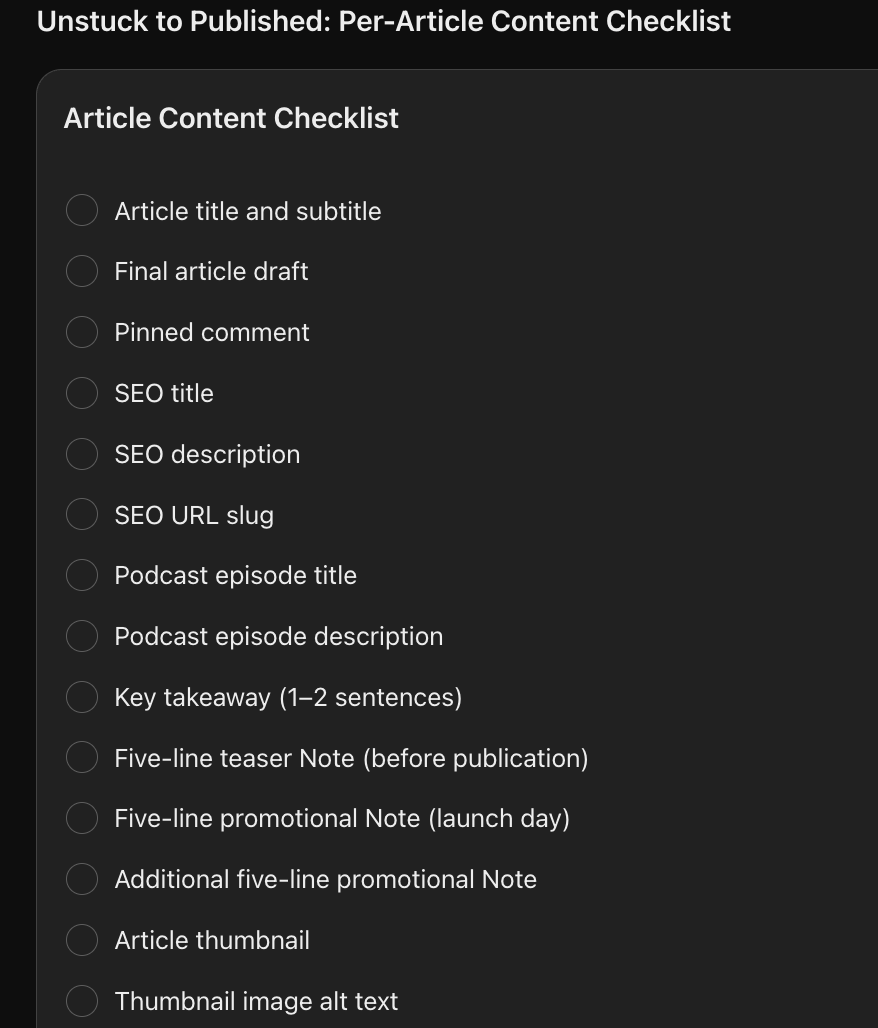
We don’t use AI because we want to spend less time thinking about what I’m writing.
→ We use it because we want to spend less time managing everything that comes with publishing what we’ve written.
There’s a difference.
Stop treating AI as an article generator and start treating it as a publishing assistant.

Watch Episode 029
Watch the full conversation with Jess, The Creator and Robyn Levin of Finding Your Edge and Rare Finds - Luxury Travel for more examples of how we’re incorporating AI into our content creation processes.
Watch the Episode 029 replay above.
Let’s Talk About It
Which part of your Substack publishing process takes up the most time?
Are you currently using AI to help you with that responsibility, or have you primarily been using it for writing?
Robyn and I would love to hear how you’re incorporating AI into your publishing workflow! 💜👑
Tell us about your publishing process in the comments.
Resources From This Conversation
Read Jess & Robyn’s collab article about increasing AI-search discovery & visibility →

Two of Robyn’s favorite cutting-edge AI tools she’s been using for years:
OpusClip: Robyn uses this to turn longer videos into shorter clips, remove filler words and pauses, add branded captions, and prepare videos for different platforms.
Magai: This platform provides access to multiple AI models within one interface, allowing Robyn to select and compare models depending on the task she’s working on.
If you’re producing a lot of video content or regularly switching between AI models, these tools may be worth exploring.
Follow Jess at Unstuck to Published →

Follow Jess at NP Fellow Become The CEO of Your Health →


Follow Jess at Nurse in the Market →

Follow Robyn at Finding Your Edge →


Follow Robyn at Rare Finds - Luxury Travel →


Scan Robyn’s QR code to access her Youtube channel →

Thank You
Thank you so much for everyone who tuned into this live, your presence is truly appreciated, and to the people who are watching the replay, thank you!
See you next Friday at 12pm ET for our weekly show, stay tuned!
-Jess, The Creator & Robyn Levin


