

One of the questions I get asked most is:
“How do I start a podcast on Substack?”
The good news?
You don’t need a recording studio, you don’t need expensive equipment, you don’t need years of podcasting experience, and you definitely don’t need thousands of subscribers before you begin.
You simply need an idea, a way to record your voice, and a place to publish it.
Substack gives you all three.
However, before we jump into the setup, there’s one thing I think every creator should understand.
Your Podcast Isn’t A Separate Business
When most people think about starting a podcast, they imagine launching something completely separate from everything else they’re already creating.
A new brand.
A new audience.
A new platform.
A new business.
That’s not how I think about podcasting on Substack.
I think of a podcast as another doorway into your publication.
→ Some people love reading.
→ Others would rather listen while they’re driving to work, walking the dog, cooking dinner, or exercising.
They’re consuming the same ideas.
They’re simply choosing a different format.
That’s what makes podcasting on Substack so powerful.
Your podcast isn’t living on an island.
It connects directly to your:
Articles
Notes
Live videos
Chat
Subscribers
Paid memberships
Everything strengthens everything else.
One article can become a podcast.
One podcast can spark a conversation in Notes.
That conversation can inspire your next article.
Your publication becomes an ecosystem instead of a collection of disconnected content.
That’s the mindset I want you to have as we go through this guide.
You’re not creating more work.
You’re creating more ways for people to connect with your ideas.
Now let’s build your podcast.
Step 1: Decide What Your Podcast Is About
Before you click a single button inside Substack, spend a few minutes getting clear on your podcast.
You don’t need a detailed business plan.
You just need a simple answer to four questions.
Ask yourself:
Who is this podcast for?
What will I talk about?
Why would someone listen?
How often can I realistically publish?
Keep it simple.
For example:
“This podcast helps new Substack creators build, publish, and grow with more clarity.”
Or...
“This is where I read my weekly articles for readers who prefer listening.”
Or...
“Every week I share conversations about publishing, creativity, and building an audience.”
Notice something?
None of those are complicated.
They’re clear and clarity matters far more than cleverness.
Your first version doesn’t have to be perfect.
It simply has to give listeners a reason to press play.
Step 2: Choose Your Podcast Format
Now decide what type of podcast you want to create.
There isn’t one right answer.
Choose the format you’ll actually enjoy creating.
Some simple options include:
Solo teaching episodes
Audio versions of your written articles
Interviews with guests
Weekly reflections
Reader Q&A episodes
Recorded Substack Lives
If you’re just getting started, I’d recommend keeping it simple.
In fact, one of the easiest ways to begin is by reading one of your existing articles aloud. I’ve been doing this for over a year now and have received positive feedback from my readers as they appreciate listening to the article in a familiar voice.
Many creators think they need an entirely new content strategy before starting a podcast.
You don’t.
If you’ve already published ten articles...you already have ten podcast episodes waiting to happen.
Read the article.
Expand on a point.
Tell the story behind why you wrote it.
Answer a question a reader asked after reading it.
Podcasting doesn’t always require creating new ideas.
Sometimes it simply means delivering your existing ideas in a different format.
That’s one of the biggest advantages of building your podcast inside your publication.
Everything compounds.
One idea can become:
An article
A podcast episode
Several Notes
A Live discussion
A future workshop
→ One piece of content can create an entire week of conversations. That’s leverage.
Creator Tip: Choose the format you can repeat consistently.
Consistency builds trust.
Complexity usually builds excuses.
Step 3: Record Your First Episode
Now it’s time to record.
Here’s the good news.
Your first episode doesn’t need to be thirty minutes long, it doesn’t need professional editing, and it definitely doesn’t need to sound like an NPR production.
A strong first episode might only be five to fifteen minutes.
You can record using:
Your phone
Your computer
A simple USB microphone
Substack’s recording tools
Any basic recording app you’re comfortable using.
→ Find a quiet room.
→ Pick one topic.
→ Press record.
If you’re unsure what to say, answer these questions:
Who are you?
What’s your publication about?
Why did you start this podcast?
Who’s it for?
What can listeners expect?
How often will you publish?
That’s enough. Seriously.
Most creators delay publishing because they think the first episode has to impress everyone.
It doesn’t.
Its job is simply to exist.
You’ll improve by recording Episode 10; not by endlessly editing Episode 1.
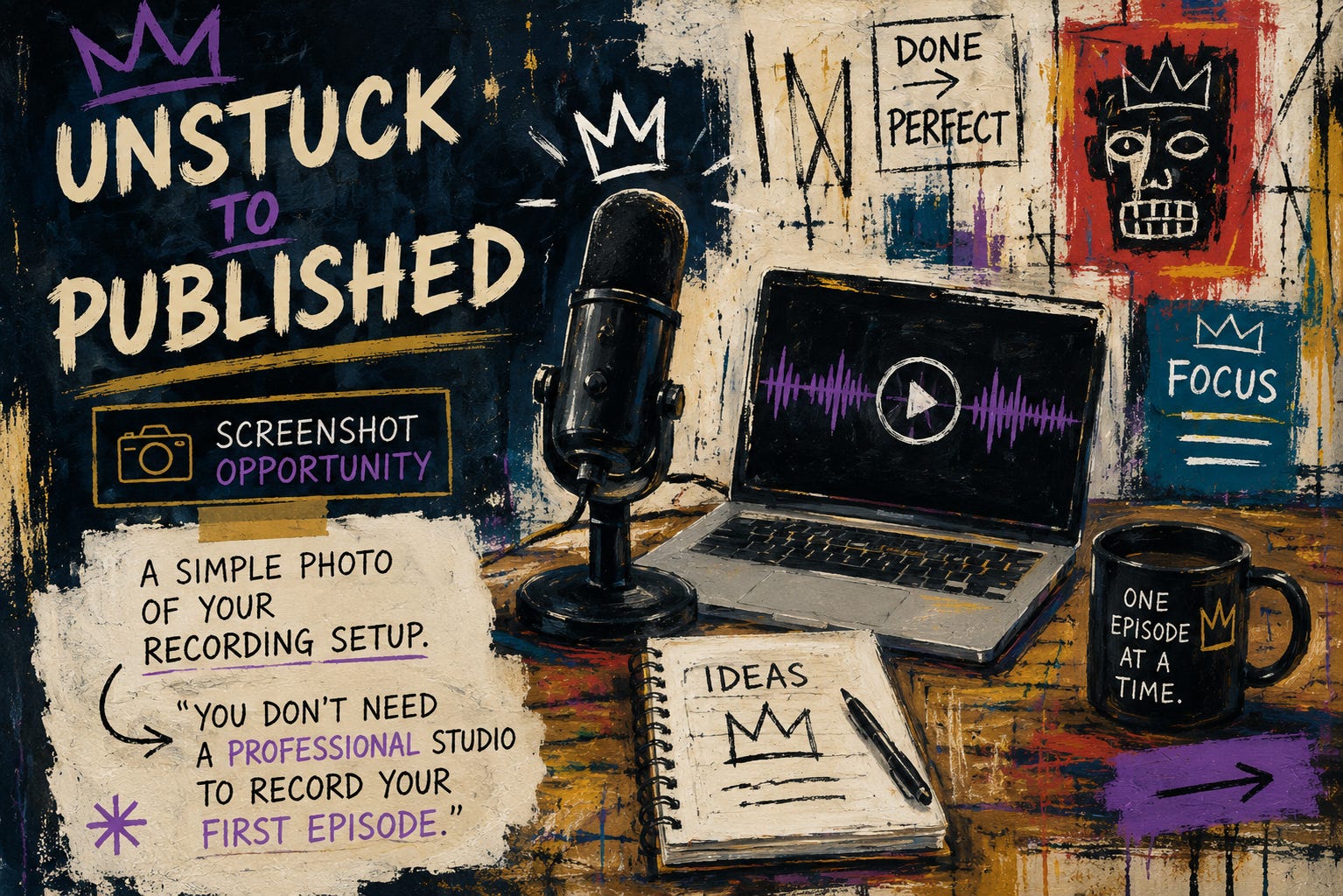
You don’t need a professional studio to record your first episode.
Step 4: Open Your Substack Dashboard
Once you’ve recorded your episode, log in to your Substack dashboard.
This is where you’ll manage everything related to your publication, including your podcast.
Depending on when you’re reading this, the layout may look slightly different as Substack continues to evolve.
Look for the podcast option within your dashboard settings.
If you don’t immediately see it, don’t worry.
Substack occasionally updates where podcast settings live, but they’re easy to find within your publication settings.
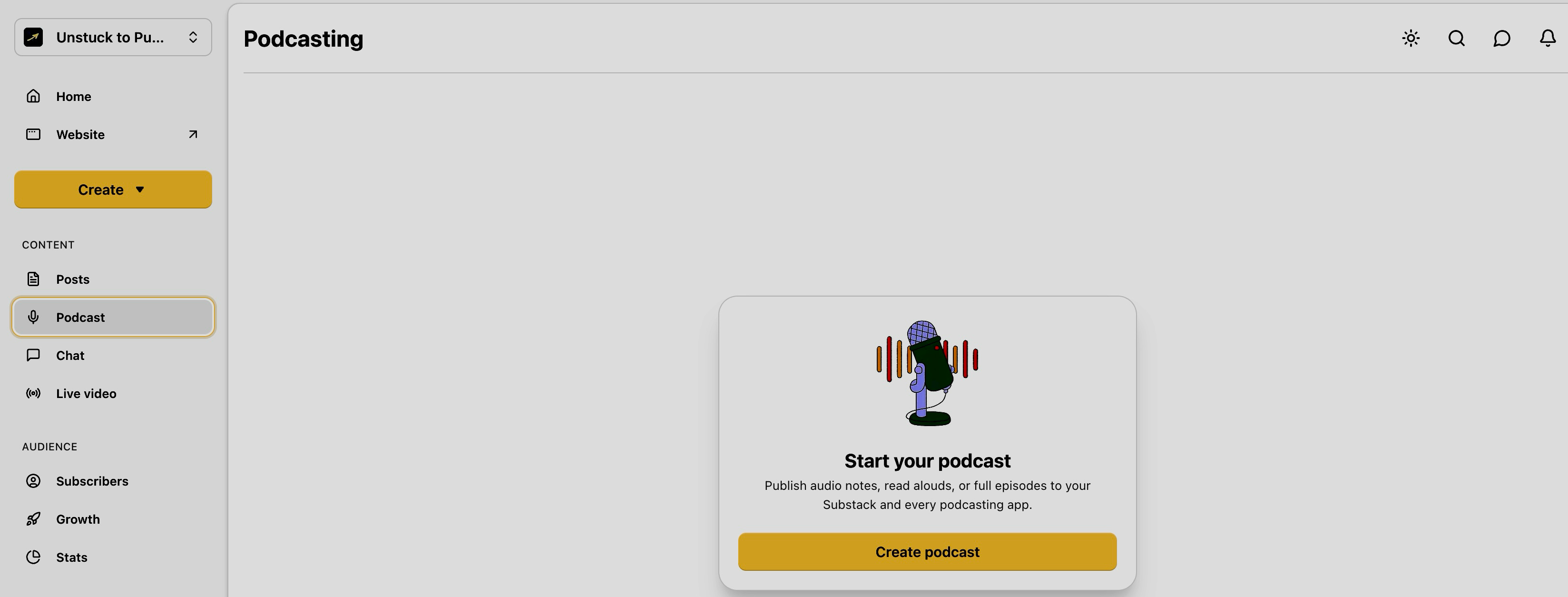
Click on “Podcast” on the lefthand side under “CONTENT” then choose ‘Create podcast” to begin setting up your show.
Step 5: Create Your Podcast
Inside your publication dashboard, choose the option to create a new podcast.
If you already host a podcast somewhere else, you’ll also have the option to import your existing RSS feed.
If you’re starting fresh, simply choose:
→ “I’m starting a new podcast”
Substack will walk you through the setup.
Don’t worry if some of the settings feel unfamiliar.
We’ll go through them together.
Remember...you’re not building an entirely separate business.
You’re adding another experience to the publication you’ve already been building.
That mindset makes the setup feel much less intimidating.
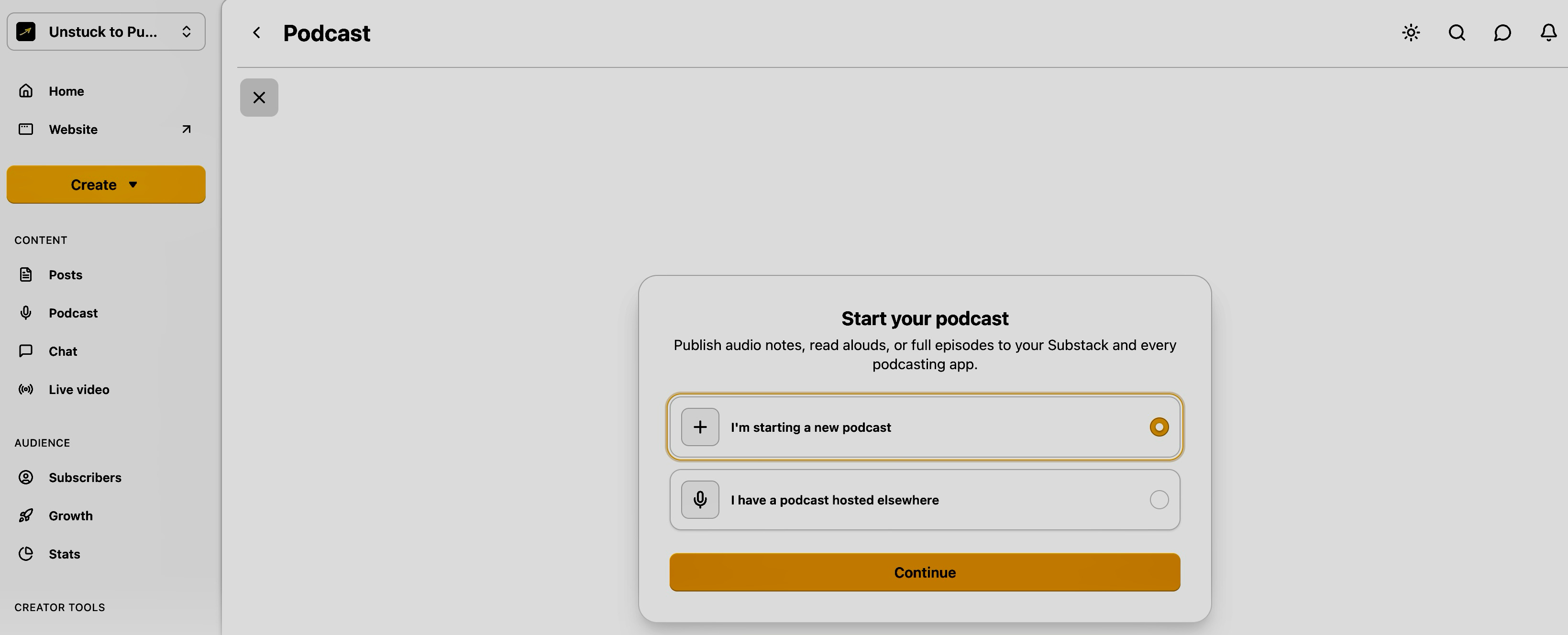
Choose “I’m starting a new podcast” if you’re starting a new one or click “I have a podcast hosted elsewhere” if you already have a podcast.
Step 6: Name Your Podcast
Now it’s time to give your podcast a name.
You have two good options.
Option 1: Use the same name as your publication.
For many creators, this is the simplest choice.
If your publication is already well positioned, keeping the names the same creates consistency across your brand.
For example:
Unstuck to Published
The Unstuck to Published Podcast
When readers see the title, they’ll immediately recognize it’s connected to the publication they already know.
Option 2: Give your podcast its own name.
Some creators want their podcast to have a slightly different identity while still supporting the publication.
For example:
The Publisher’s Podcast
The Publisher’s Desk
The Creator’s Publishing Lab
Behind The Build
Publishing Out Loud
There’s no right answer.
Just remember:
Clarity beats cleverness.
Someone should understand what your podcast is about without needing you to explain it.
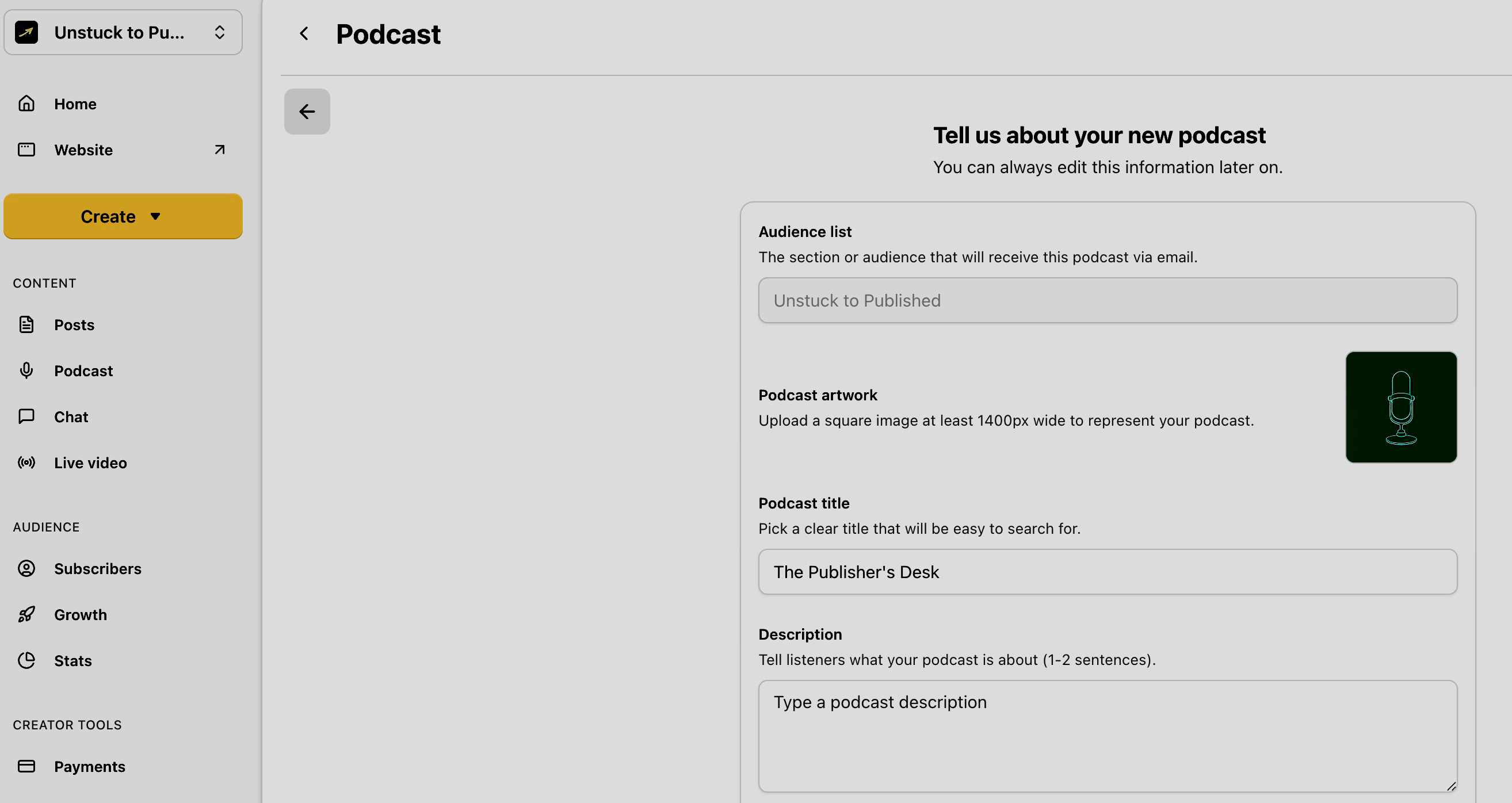
Choose a title that’s clear, memorable, and connected to your publication.
Step 7: Write Your Podcast Description
Think of your podcast description as your elevator pitch.
It doesn’t need to be long.
It just needs to answer three questions:
Who is this for?
What will listeners hear?
Why should they subscribe?
Here’s an example:
The Publisher’s Desk, brought to you by Unstuck to Published, is where creators learn how to stop overthinking and start publishing. Each episode explores the mindset, systems, and strategies behind building a publication people want to return to.
Notice what’s missing?
Long biographies.
Buzzwords.
Trying to sound impressive.
Your goal isn’t to explain everything.
It’s to make the right person think:
“This sounds like it’s for me.”
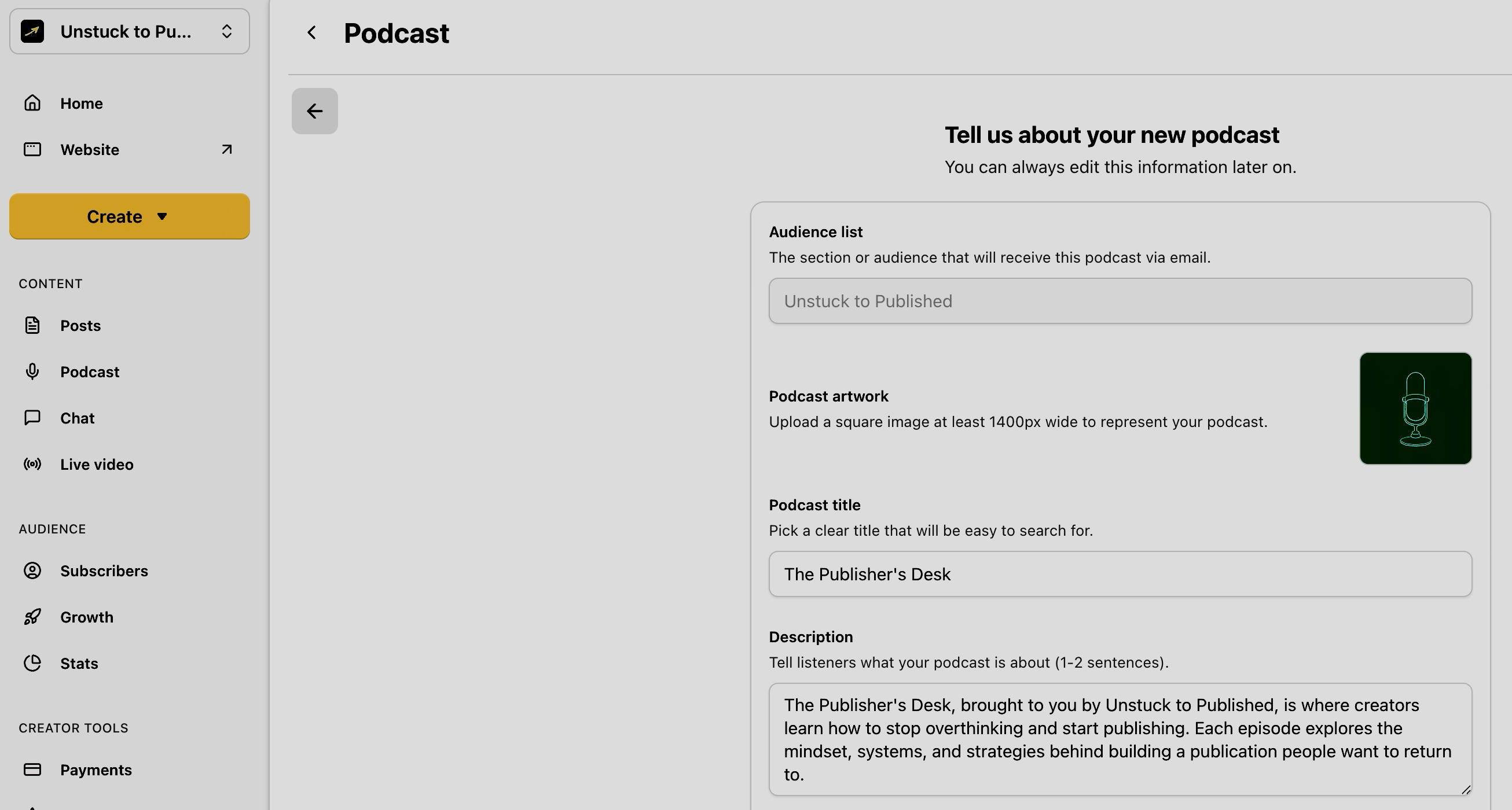
Your description should quickly explain who the podcast is for and why someone should listen.
Step 8: Add Podcast Artwork
Your podcast artwork is often the first thing people see.
Keep it simple.
A few guidelines:
Use large, readable text.
Choose high contrast.
Avoid tiny details.
Make sure it still looks good on a phone screen.
If your publication already has established branding, carry that into your podcast artwork.
Use similar colors.
Fonts.
Design elements.
Your podcast shouldn’t feel like a completely different brand.
Here’s an example of artwork for The Publisher’s Desk →
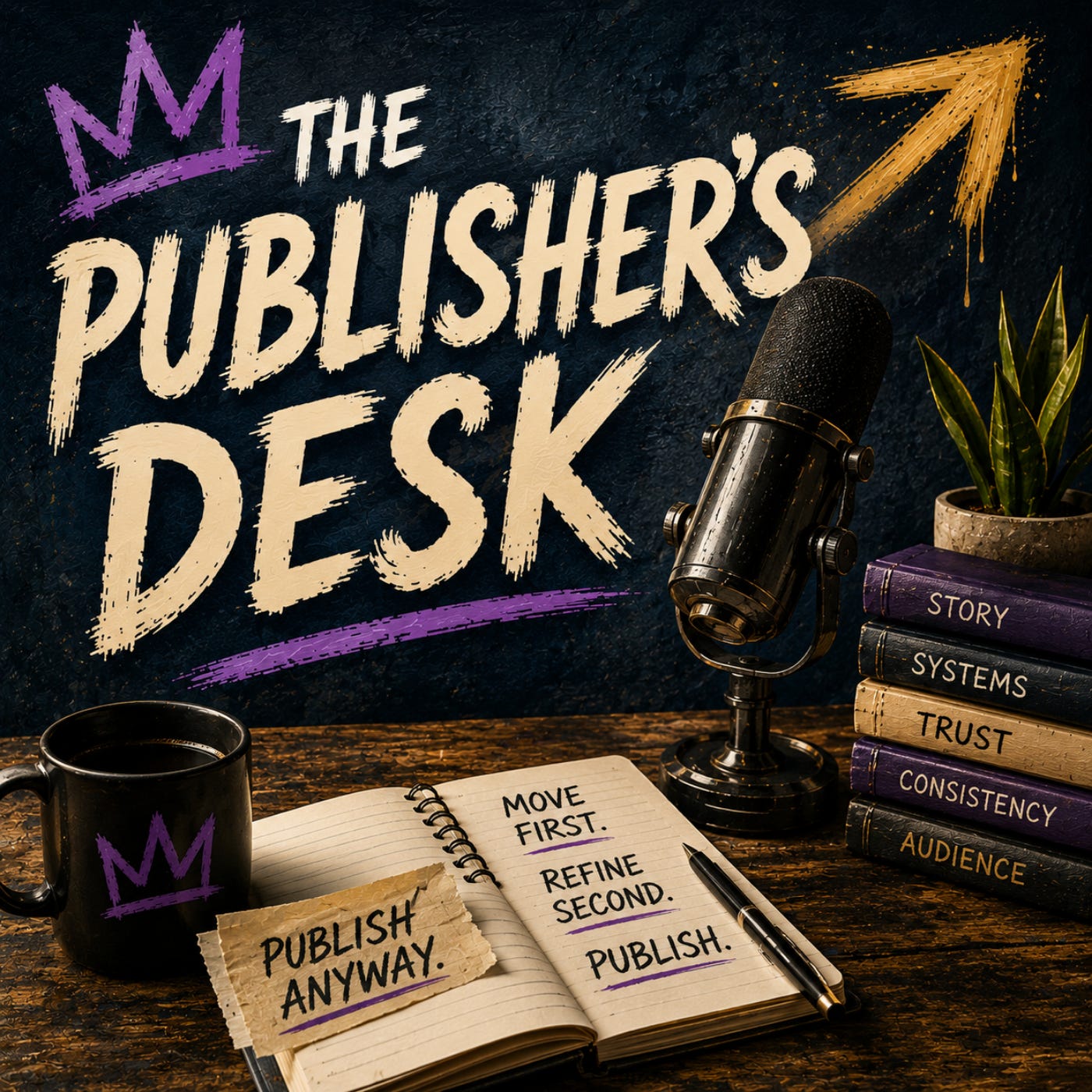
Upload a square image sized at least 1400px X 1400px to represent your podcast.
Remember:
You’re expanding your publication—not creating a second one.
The more connected everything feels, the easier it becomes for readers to recognize your work.
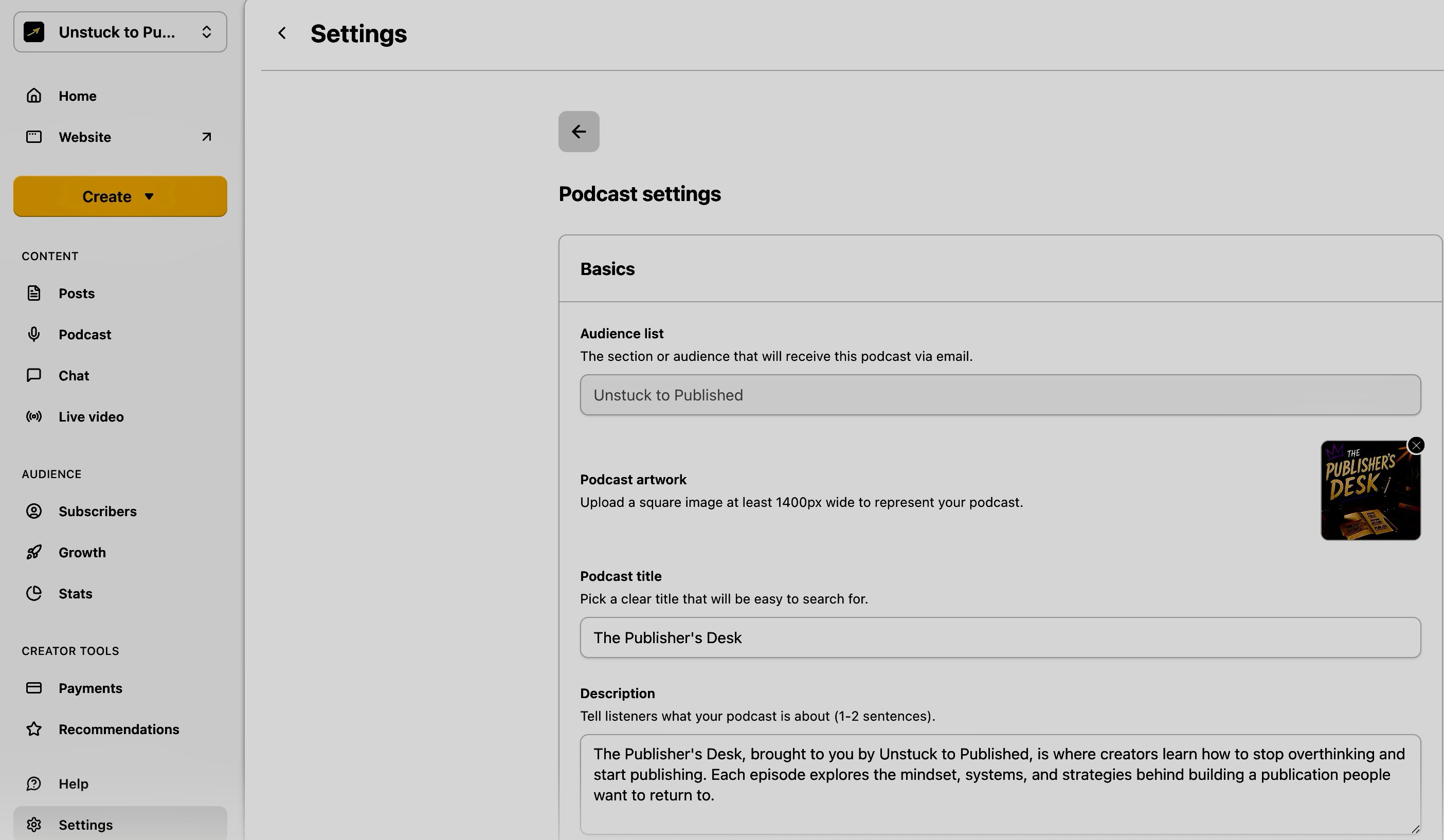
Keep your podcast artwork clean, readable, and consistent with your publication.
Step 9: Upload Your First Episode
Now for the exciting part.
→ Upload your first episode.
Substack allows you to upload audio—and depending on your setup, video as well.
You’ll be asked to add:
An episode title
A short description
Your audio or video file
Simple first episode titles might include:
Welcome to The Publisher’s Desk
Why I’m Starting This Podcast
Start Publishing Before You Feel Ready
What This Podcast Is About
For the description, don’t overthink it.
A couple or few sentences summarizing the episode is enough.
→ If you mention resources, links, or related articles, include those as well.
Remember:
Every episode becomes another piece of content inside your publication.
It isn’t separate; it’s connected.
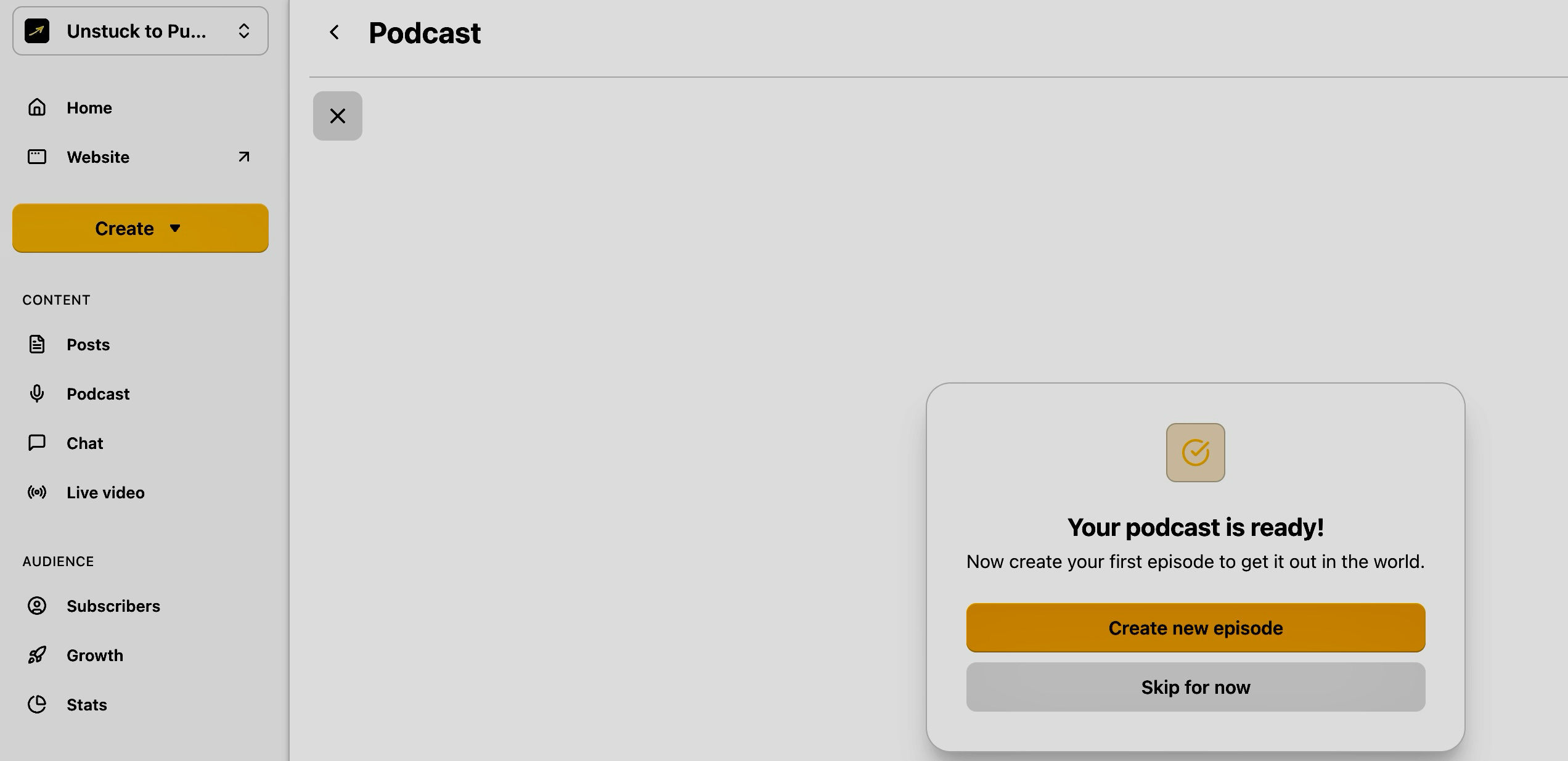
Click “Create new episode.”
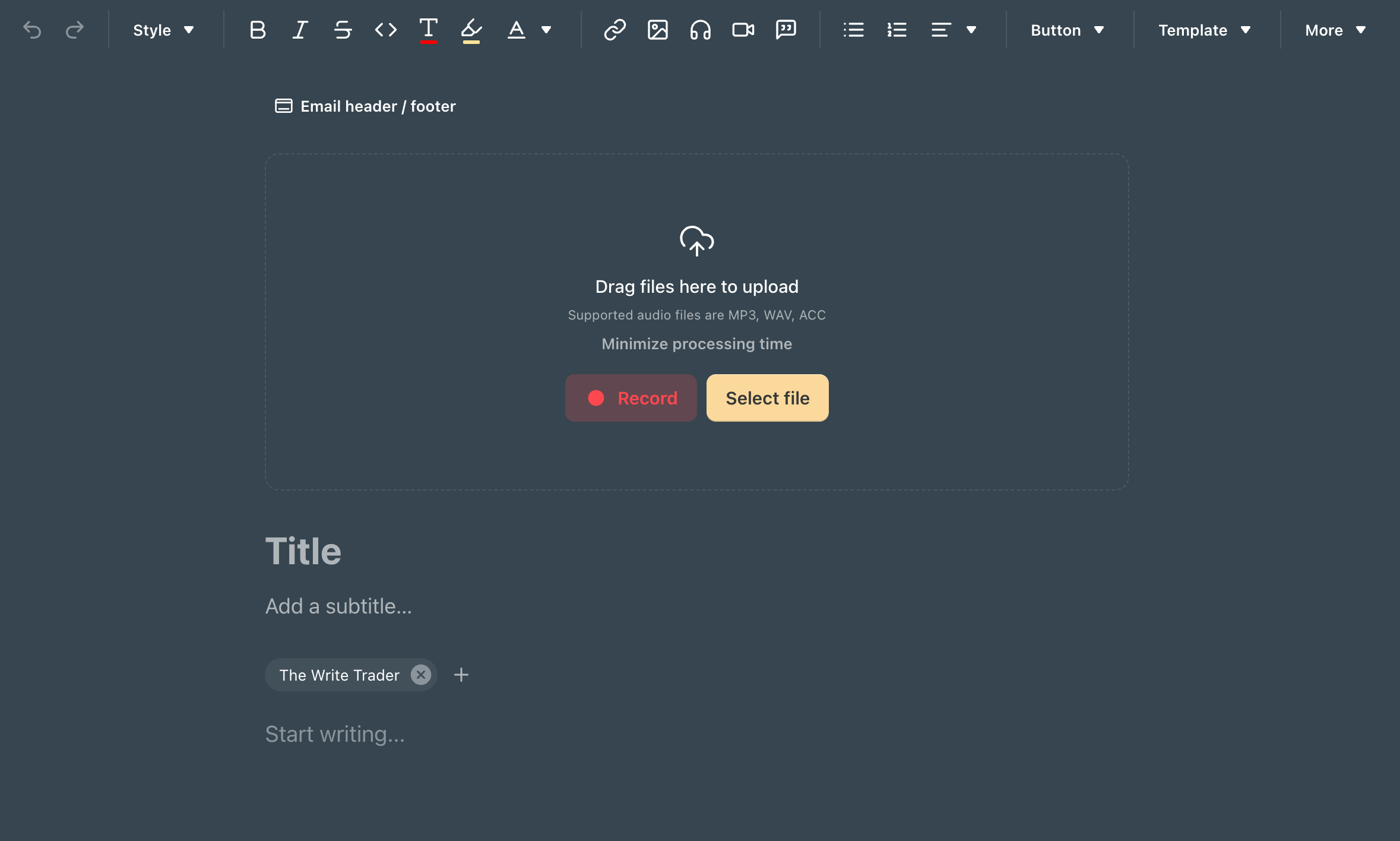
Upload a recording file or press record to get started on your first episode. Then, write a title and subtitle, and add a short description, field note, or companion article before publishing.
Step 10: Decide Who Can Listen
One of the biggest advantages of podcasting on Substack is that you control access.
→ Before publishing, decide who can listen.
Depending on your publication settings, you may choose:
Free for everyone
Paid subscribers only
Free preview with the full episode for paid members
Bonus episodes for paid subscribers
If this is your first episode, I’d recommend making it free.
Why?
Because your audience hasn’t heard your voice yet.
Give them an easy way to experience your podcast.
Once you’ve built trust and established a rhythm, you can introduce paid or bonus episodes if they make sense for your publication.
→ Don’t rush monetization.
→ Focus on connection first.
→ Trust creates subscriptions.
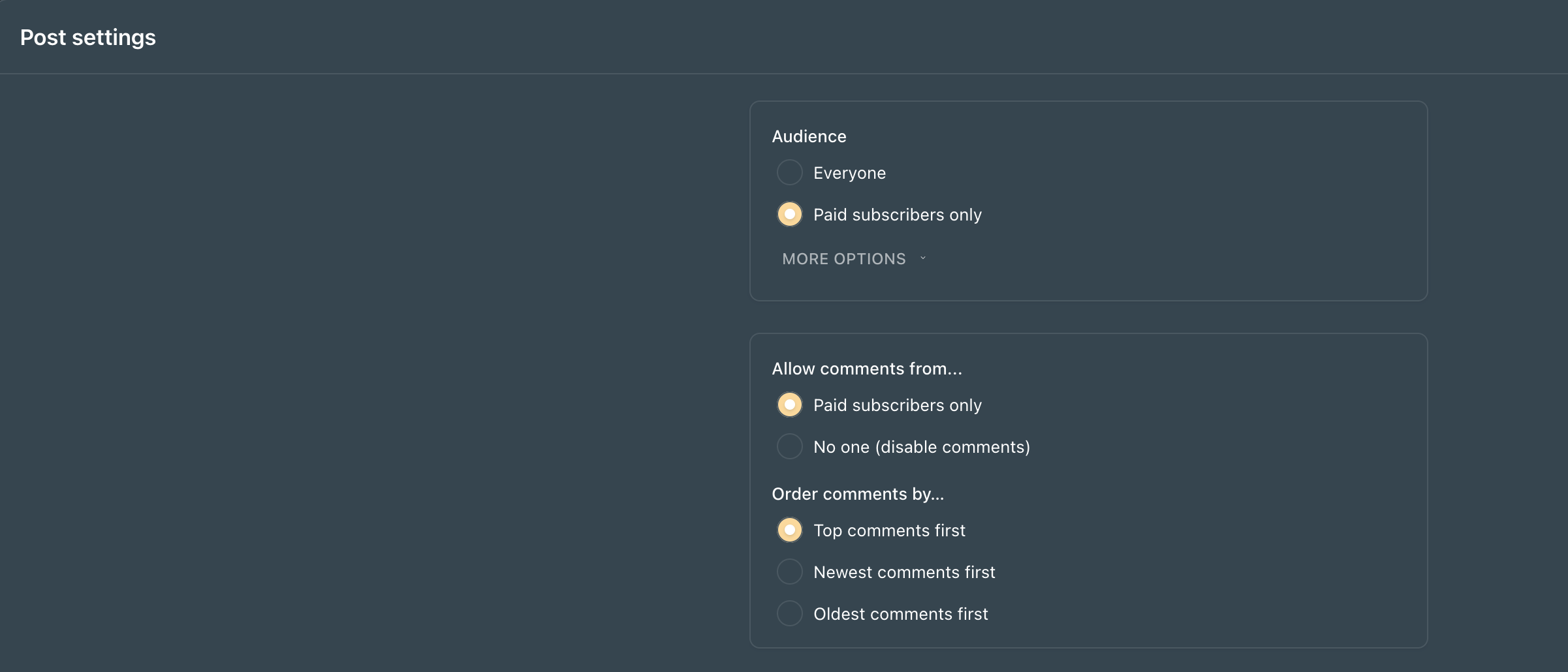
In the “episode or post Settings,” which is located in the bottom righthand corner of the post, choose your audience—whether your episode is for all subscribers a.k.a “Everyone” or “Paid subscribers only.”
Step 11: Publish Your Episode
Eventually you’ll reach the button every creator spends too much time avoiding.
→ Just publish.
This is where perfectionism usually shows up.
You’ll hear yourself differently than everyone else does.
You’ll notice every pause, every “um,” and every sentence you wish you’d said differently.
Your listeners won’t.
They’re listening for your ideas.
Your perspective and your experience.
Not flawless audio.
One of my favorite reminders is this:
→ Your first episode isn’t your final episode.
→ Its purpose is to teach you what recording Episode Two should sound like.
So when everything looks good...press publish.
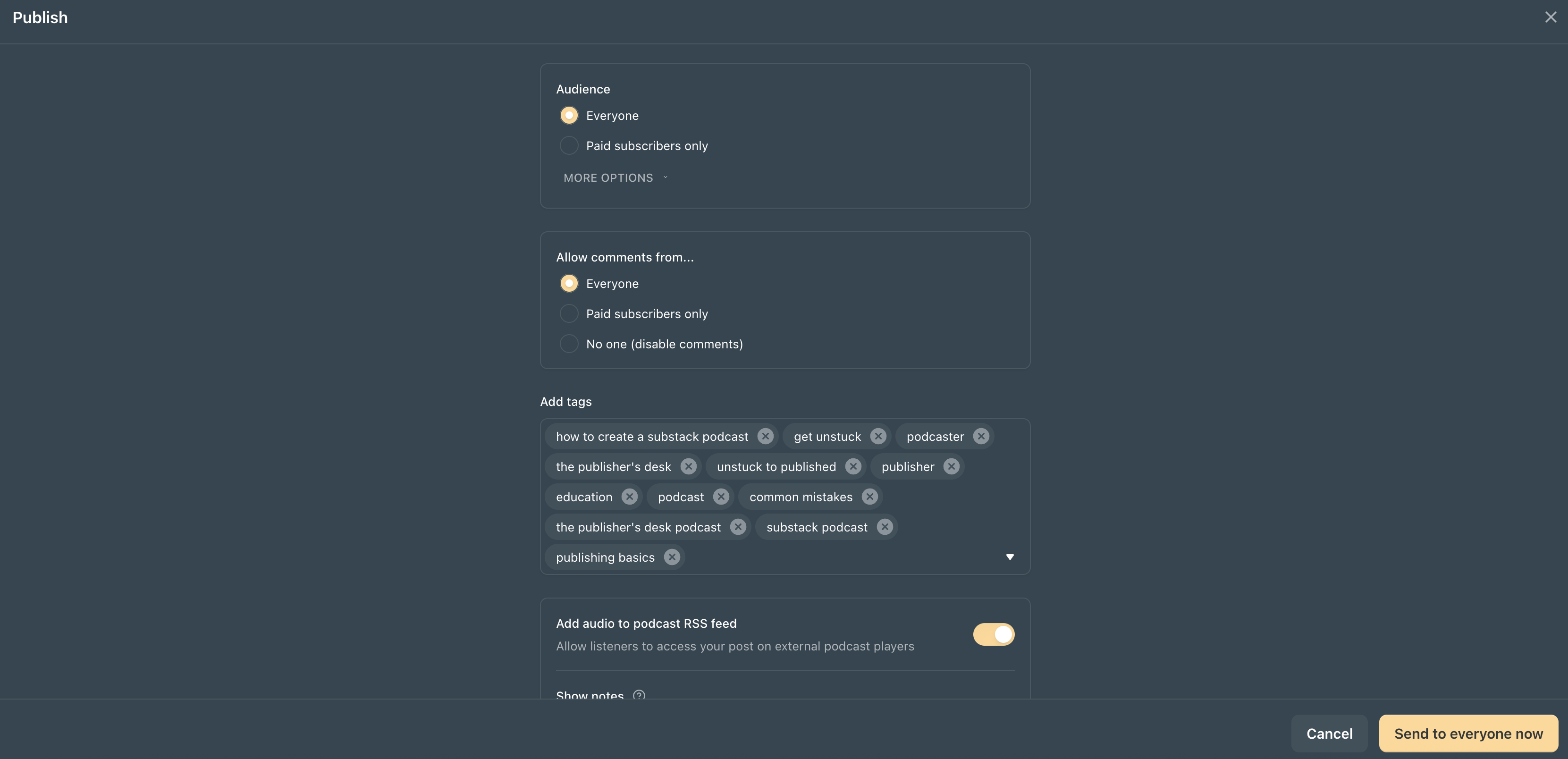
Post your podcast episode the same way you post an article. Choose “Send to everyone now” or schedule it for later and press publish!
Congratulations!! You officially have a podcast!!
The hardest button to press is usually the most important one.
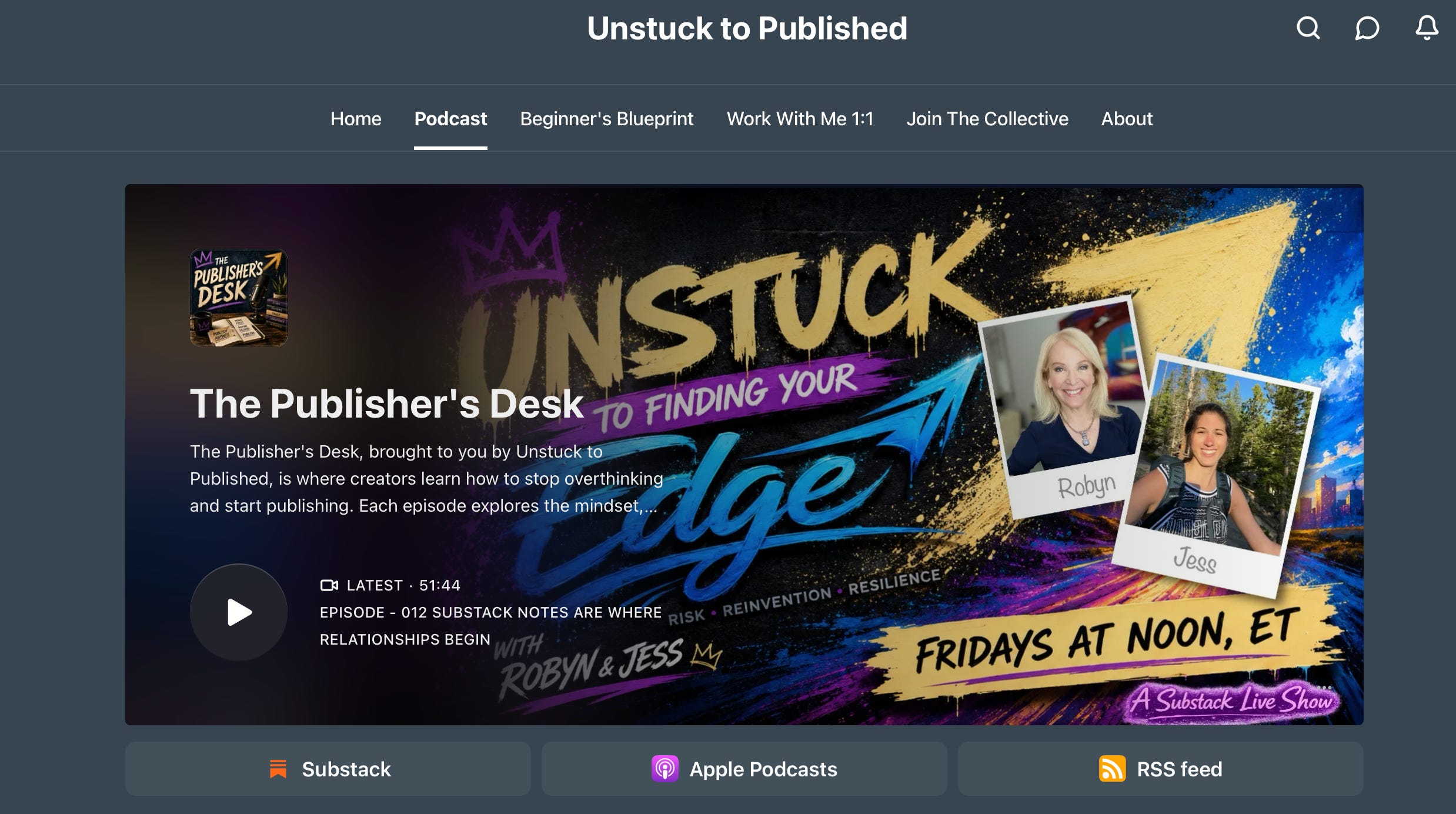
Once you create your podcast, you will have “Podcast” automatically added to your Substack Homepage Navigation Bar as seen above. There you can click to view your podcast and its episodes. ↑
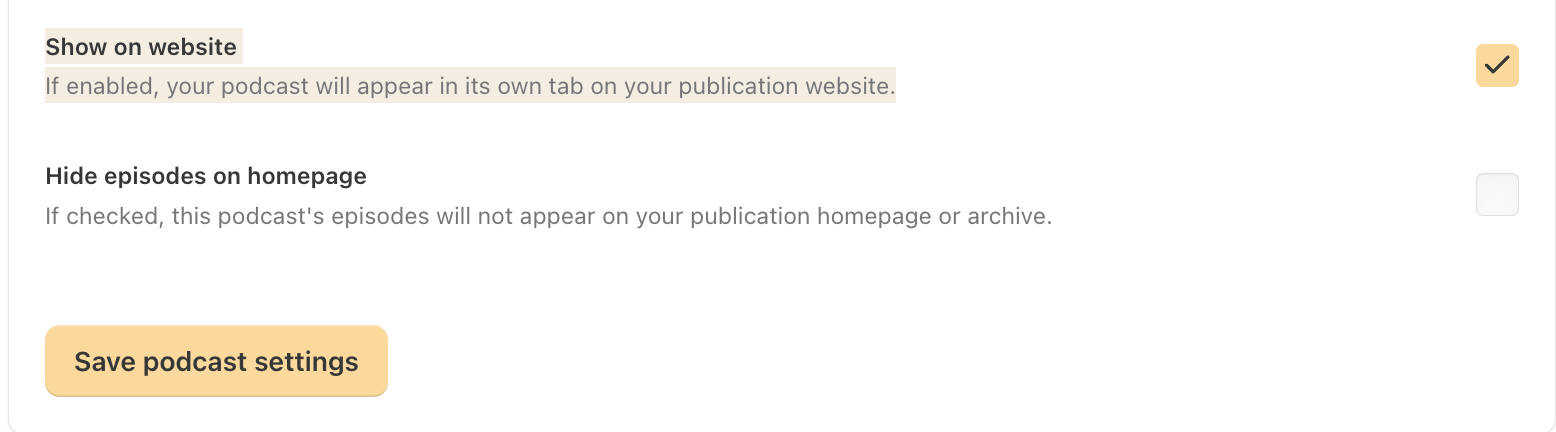
If you don’t wish to have “Podcast” added to your publication homepage a.k.a your publication website, you can uncheck the box under “Show on website” in your podcast settings to remove it from the navigation bar. ↑
You can update your podcast layout in your publication Dashboard under “Settings” through the “Website Editor” under “CONTENT“,” click “Podcasts.” ↓
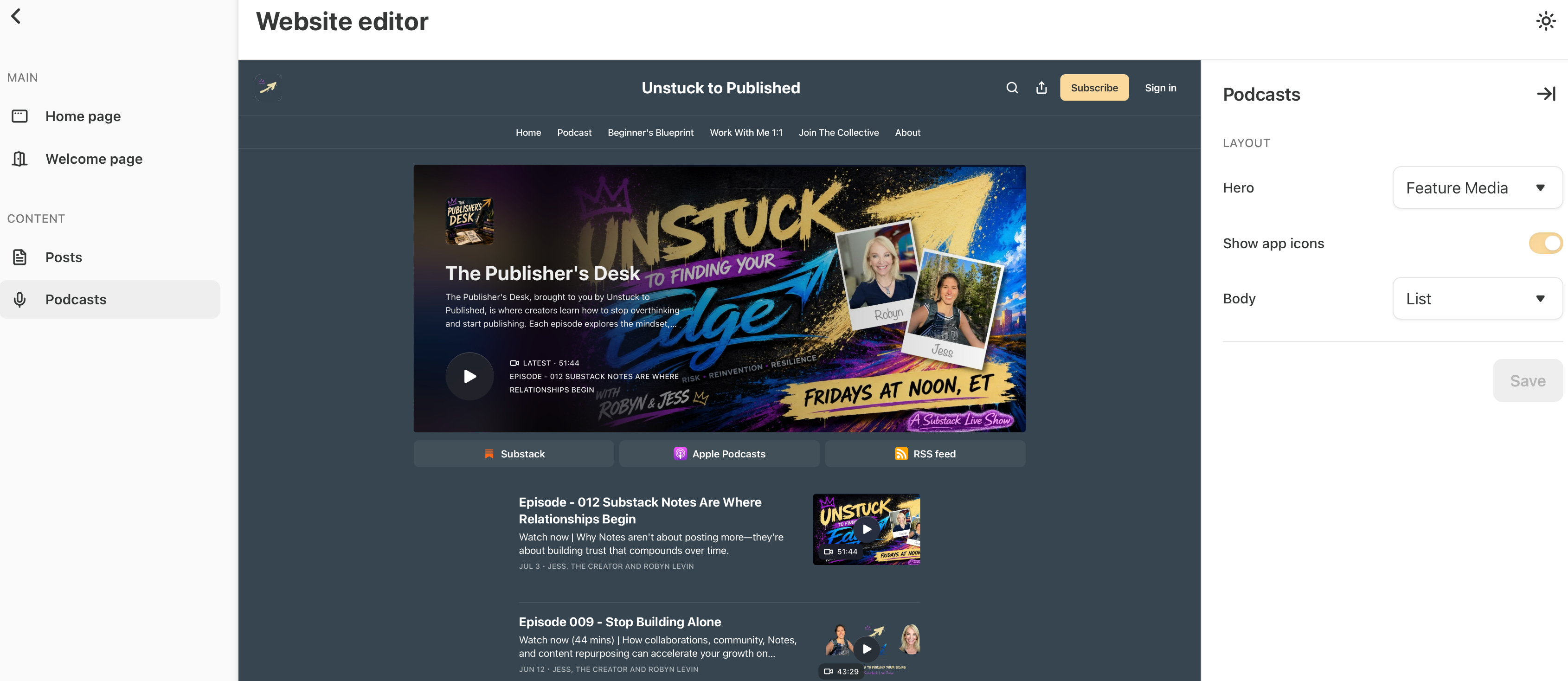
I picked “Feature media” for my podcast layout and I chose “List” for the body of episodes.
Step 12: Share Your Episode
Publishing isn’t the finish line.
It’s the beginning.
Tell people your episode is live.
Share it in Notes.
Mention it in your next newsletter.
Reference it inside Chat.
Link to it from your About page.
Include it in your welcome email.
Don’t assume people will stumble across it.
Invite them.
For example:
“🎙️ I just published the first episode of my Substack podcast.
If you prefer listening instead of reading, I’d love for you to check it out.”
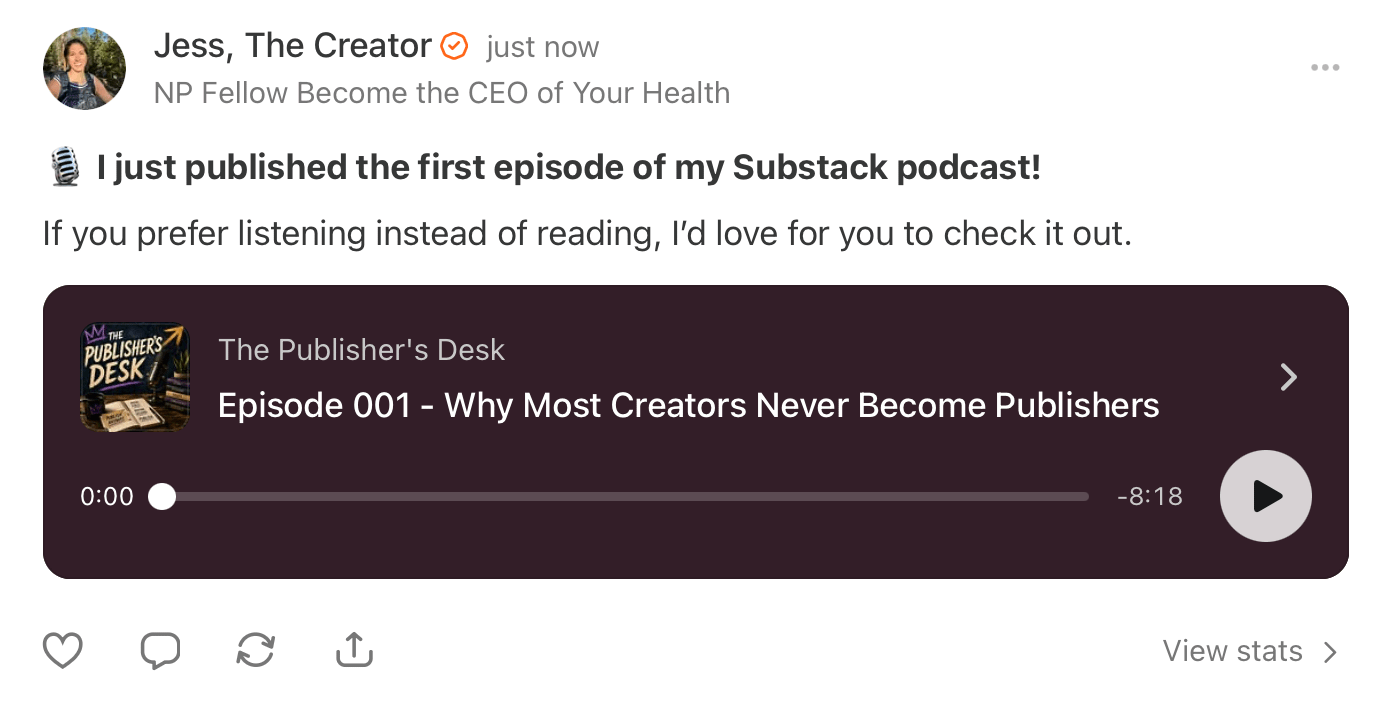
→ Always include a link to the podcast episode whether you’re mentioning it in an article, posting a Note your episode is live, inside your community chat, etc.
Simple and friendly and no complicated launch campaign required.
Step 13: Let Your Podcast Reach Beyond Substack
One of the best parts of podcasting on Substack is that your content doesn’t have to stay on Substack.
Depending on your settings, your episodes can also be available through:
Spotify
Apple Podcasts
RSS feeds
Other podcast apps
YouTube (if you’re publishing video)
That means you can manage your podcast from one place while still allowing listeners to use the apps they already enjoy!!
→ Your publication becomes your home base.
→ Everything else simply extends its reach.
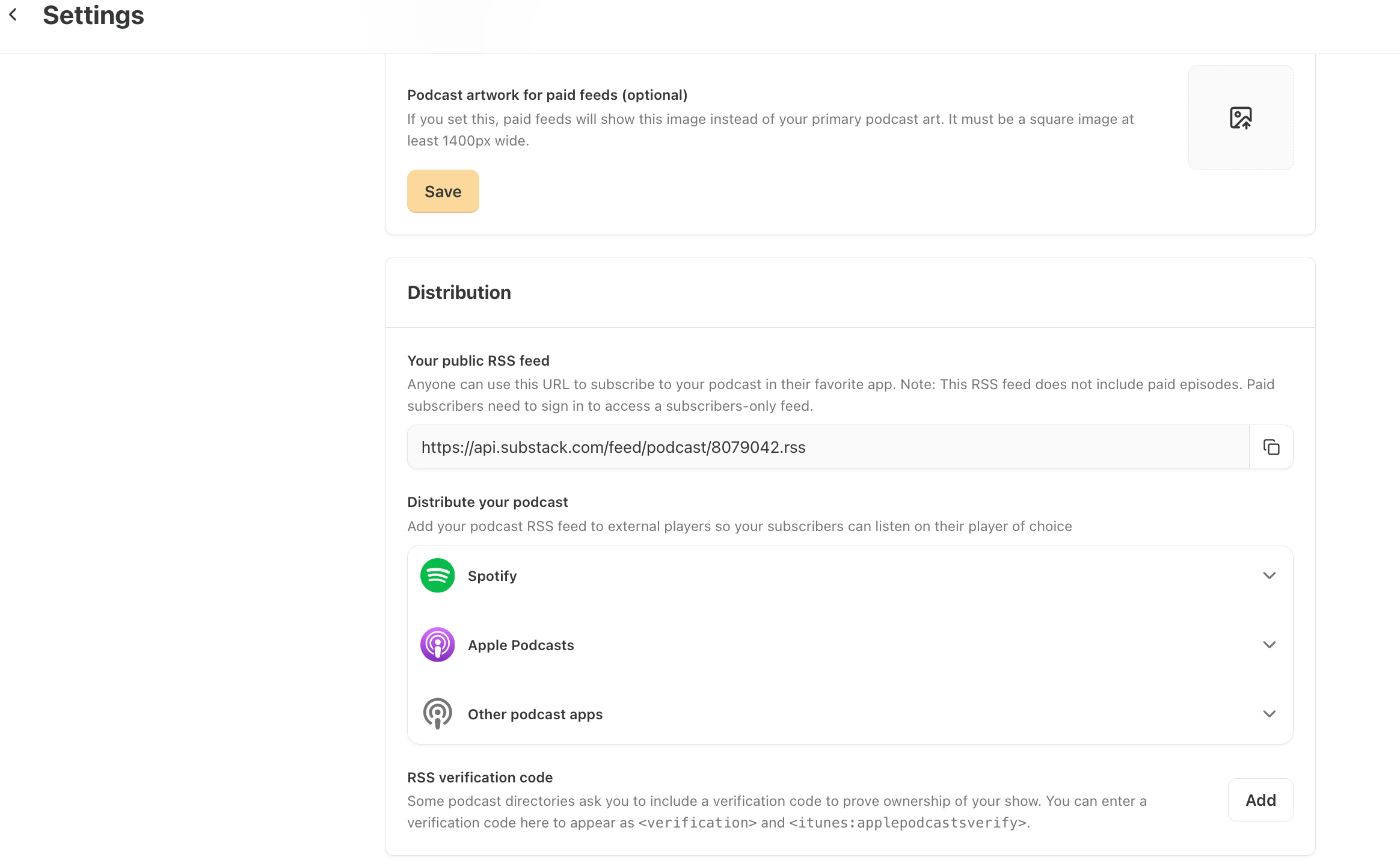
Substack can distribute your podcast to the platforms your audience already uses.
To access the “Distribution Settings,” go to your publication Dashboard, click “Podcast” on the lefthand menu bar and then click “Settings” to access the “Podcast settings.”
Scroll down to “Distribution” and choose how you want to “Distribute your podcast.”
Podcast Launch Checklist
Before you hit Publish, there’s one thing I want you to remember.
Launching a podcast on Substack isn’t about having the perfect microphone, recording studio, or editing software.
It’s about getting your first episode into the world.
I’ve put together a simple checklist you can use before publishing your first episode.
Save it, bookmark it, and come back to it every time you launch a new show. →
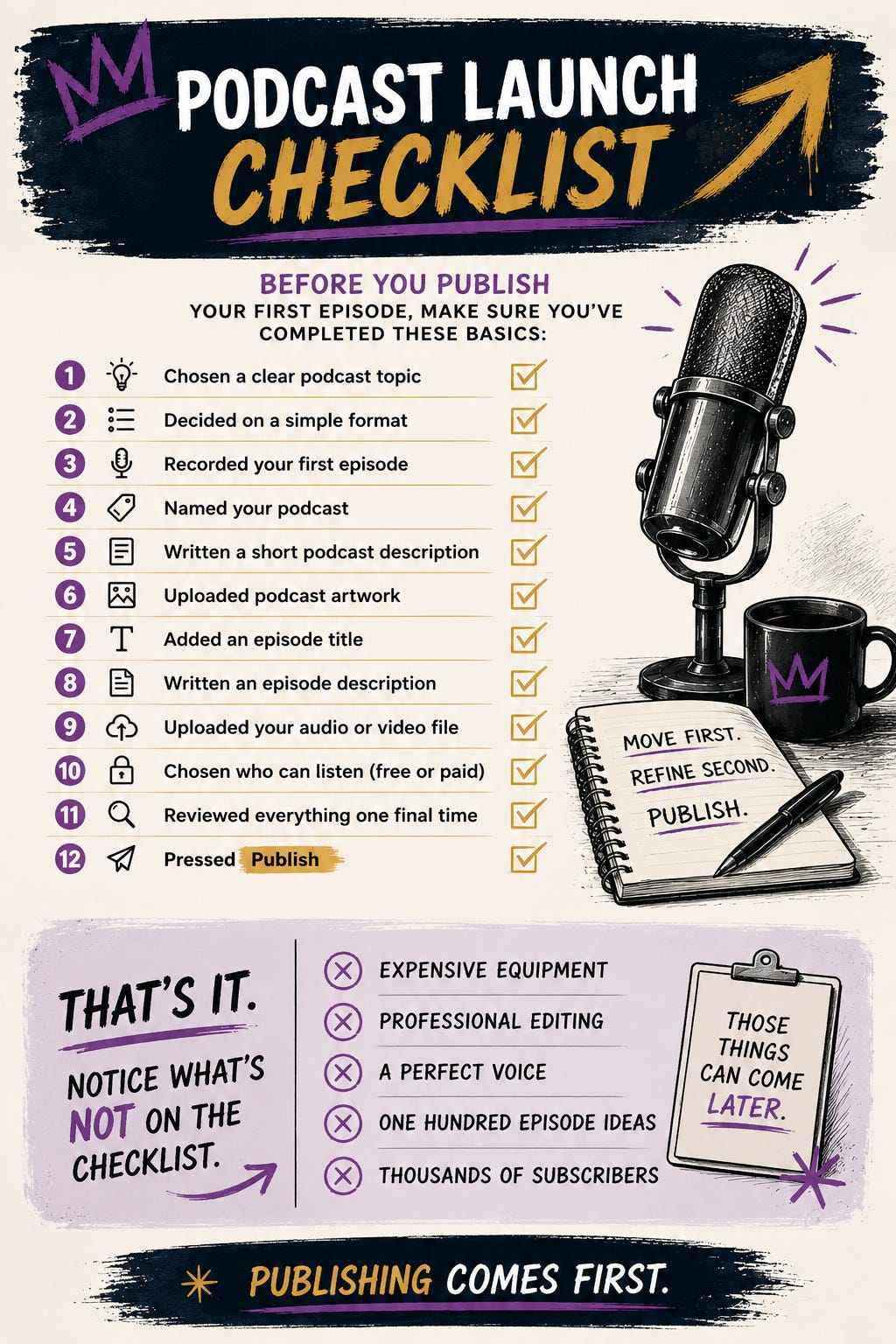
Notice what’s missing from the checklist.
No expensive equipment.
No professional editing.
No perfect voice.
No massive audience.
Those things might help later, however, they aren’t what gets you started.
Publishing comes first.
Everything else gets easier after you’ve pressed Publish once.
💡 Pro Tip: Don’t treat this as a one-time checklist. Save it somewhere you’ll actually find it again. Every time you launch a new podcast—or help someone else launch theirs—you’ll already have the process mapped out.
Common Mistakes To Avoid
Before I wrap up, I want to leave you with some mistakes I see creators make when starting a podcast on Substack.
1. Waiting Until Everything Is Perfect
The biggest mistake is waiting.
Waiting for better equipment.
Waiting until you’re more confident.
Waiting until you have a larger audience.
Your first episode isn’t supposed to sound like your fiftieth.
It’s supposed to teach you how to create your second.
2. Creating A Completely Separate Brand
Your podcast doesn’t need to feel disconnected from your publication.
If someone enjoys your articles, your podcast should feel like a natural extension of that experience.
The strongest Substack publications create consistency across every part of the platform.
3. Thinking Every Episode Has To Be New
Many creators believe every podcast episode requires a brand-new idea.
It doesn’t.
Read one of your articles aloud.
Expand on a section.
Share the story behind why you wrote it.
Answer a reader’s question.
One idea can become multiple pieces of valuable content.
That’s not repetition.
That’s leverage.
4. Focusing On Downloads Instead Of Connection
Every platform has metrics.
Podcasting is no different.
Downloads matter; however, relationships matter more.
If one listener finishes your episode and feels more connected to your publication than they did before, your podcast is doing its job.
Build trust first.
The numbers tend to follow.
Final Thoughts: If You’re Stuck Right Now
One of the reasons I love podcasting on Substack is that it doesn’t ask you to build something completely separate.
It asks you to deepen what you’ve already started.
Your publication is still the foundation.
Your articles teach.
Your podcast gives people another way to experience those ideas.
Your Notes help readers discover them.
Your Chat keeps the conversation going.
Your Live videos can become future podcast episodes.
Everything supports everything else.
That’s why I don’t think of podcasting as creating more content.
I think of it as creating more opportunities for connection.
→ Some people will always prefer reading.
→ Others will connect with your voice in a way they never could through text alone.
Both experiences matter because at the end of the day, people aren’t subscribing because you wrote an article or recorded a podcast.
They’re subscribing because they trust the person creating them.
So don’t wait until you have the perfect microphone, don’t wait until you’ve mapped out your first fifty episodes, and definitely don’t wait until you finally feel like a “real” podcaster.
Record one episode.
Upload it.
Publish it.
Learn from it.
Then do it again because your first episode doesn’t need to be perfect.
It just needs to exist.
If you’re building your Substack and want more clear, foundational breakdowns like this, subscribe and follow along.
Unstuck to Published exists to help you build correctly from day one, with structure.
Thank you so much for being here. I truly appreciate you.
— Jessica
Move first. Refine second. Publish with structure.
ICYMI, Previous Articles & Live Episodes →


Scan the QR code below to subscribe to Unstuck to Published →
Thanks for reading!
I’d love to make the comments as valuable as the article itself.
If you started a podcast tomorrow, what would it be about?
Or, if you’re not ready yet, what’s the biggest thing holding you back?
I’ll be hanging out in the comments today and would love to help you think it through.
this article is pure gold!